


If your apartment is already connected to the fiber network, it is also equipped with an OTO plug (OTO = Optical Telecommunications Outlet). In general, there is only one OTO plug per apartment. Usually this OTO plug is…
What is an optical connector, OTO (Optical Termination Outlet)?
Last updated: April 2026
Reading time: ~2 min
Audience: Boxis customers and administrators.
What you'll accomplish
- Complete the configuration or task described in this guide for your Boxis service.
Prerequisites
- Access to the interface, device, or server described below.
- Information or credentials you received from Boxis (contract, welcome e-mail, or client area).
Note Boxis: Offers and screens may differ slightly depending on your product. When in doubt, open a support ticket with your service reference.
If your apartment is already connected to the fiber network, it is also equipped with an OTO plug (OTO = Optical Telecommunications Outlet). In general, there is only one OTO plug per apartment. Usually this OTO plug is located next to the main telephone plug. Each OTO plug carries a unique identification number, e.g. B.012.345.678.9. Older models may carry a number in a different format like WP1234567.
The optical connector is a hard wired device on which the optical fiber ends. This optical socket is the optical interface between the connected equipment and connection to the Internet.
The following illustrations show you the different types of OTO plugs used in Switzerland:
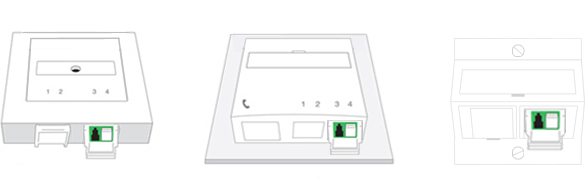
An optical connector (OTO socket) has up to four connectors. We will inform you by letter which use to your benefit during the ordering process.
Expected result
- The product behaves as described in each step (connectivity, message, or UI state).
If something goes wrong
- Repeat the step and check for typos (hostnames, passwords, ports).
- Note the exact error message or screenshot.
- Open a ticket in the Boxis client area with the service name, time of the test, and any trace (e.g. traceroute) if it is a network issue.
See also
- Other articles in the same category in the Boxis knowledge base.
/knowledgebase/— main knowledge base index.