


If you want to terminate your web hosting you must go in your client area and follow these steps : - Log in your client area with the Client area tab located top right of the home page of https://www.boxis.net - Go in M…
Terminate your web hosting
Last updated: April 2026
Reading time: ~2 min
Audience: Boxis customers and administrators.
What you'll accomplish
- Complete the configuration or task described in this guide for your Boxis service.
Prerequisites
- Access to the interface, device, or server described below.
- Information or credentials you received from Boxis (contract, welcome e-mail, or client area).
Note Boxis: Offers and screens may differ slightly depending on your product. When in doubt, open a support ticket with your service reference.
If you want to terminate your web hosting you must go in your client area and follow these steps :
- Log in your client area with the Client area tab located top right of the home page of https://www.boxis.net
- Go in My products, then click on the web hosting that you want to terminate.
- Click on the tab located at the right of your service.

- Then click on Request Cancellation
- You can explain us the reason of your cancellation as well as choose your cancellation type. Then click on Request Cancellation.
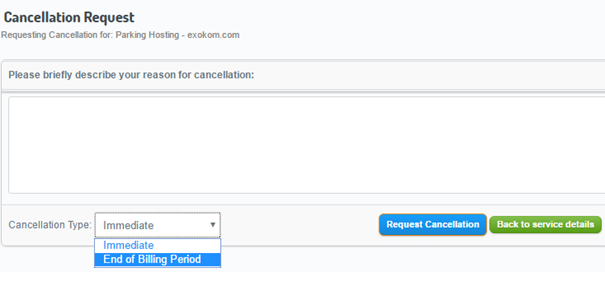
If you wish to cancel your cancellation, contact us immediately. However, if you have checked immediate cancellation, it may be too late.
Expected result
- The product behaves as described in each step (connectivity, message, or UI state).
If something goes wrong
- Repeat the step and check for typos (hostnames, passwords, ports).
- Note the exact error message or screenshot.
- Open a ticket in the Boxis client area with the service name, time of the test, and any trace (e.g. traceroute) if it is a network issue.
See also
- Other articles in the same category in the Boxis knowledge base.
/knowledgebase/— main knowledge base index.